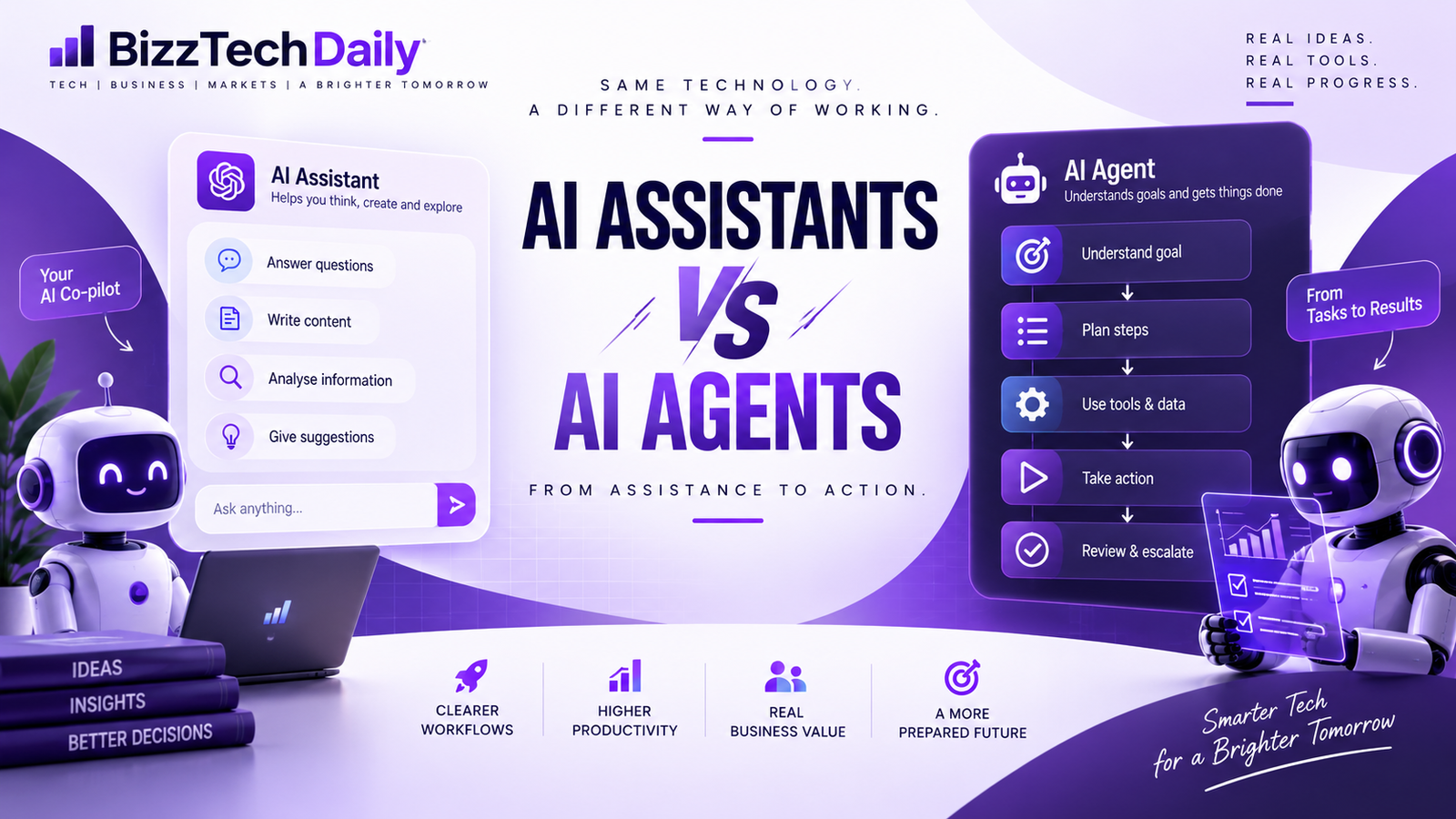
AI Agents vs AI Assistants: What’s the Difference in 2026?
For a business owner, the difference between an AI assistant and an AI agent isn’t really about what the AI can say.
It’s about what happens after it says it.
Imagine a company receives 50 enquiries through WhatsApp in one day.
An AI assistant can help a salesperson summarize those conversations, identify interested customers, draft replies and perhaps prepare a follow-up list.
An AI agent could potentially go further: check the CRM, identify which leads need attention, gather the relevant product information, prepare personalized responses, update records and send or schedule approved follow-ups.
Same business problem.
Very different level of involvement.
That’s why the conversation around AI agents vs AI assistants has become more important in 2026. The technology is moving from generating useful outputs toward interacting with the systems and workflows where actual work happens.
But there’s an important catch.
More autonomy doesn’t automatically mean more value.
If a company’s customer data is scattered across spreadsheets, its approval process exists only in employees’ heads and nobody knows who is allowed to make which decision, giving an AI agent more access could create more problems rather than fewer.
So the useful question isn’t simply:
“Which is more advanced?”
It’s:
“Which tasks should AI help with, and which tasks should AI actually be allowed to handle?”
That’s the distinction we’ll explore.
AI Agents vs AI Assistants: The Difference Is in the Workflow
A useful way to separate the two is to look at who owns the next step.
With an assistant, the workflow usually looks like:
Human → AI → Human → Action
You ask the AI to analyse something. It produces an answer. You review it. Then you decide what happens next.
With an agent, the workflow can look more like:
Human → Goal → AI → Plan → Tools → Action → Human oversight
The agent isn’t simply producing an output. It’s participating in the workflow.
Consider a simple marketing example
Suppose a company wants to improve a poorly performing Meta Ads campaign.
An AI assistant might:
- analyse campaign data
- identify expensive ad sets
- explain possible reasons for poor performance
- suggest new creatives
- draft revised ad copy
The marketer still has to open the ad account, decide which changes are appropriate and implement them.
An AI agent, when connected to the appropriate systems and permissions, could potentially:
- Pull campaign performance data.
- Compare it with previous campaigns.
- Identify underperforming segments.
- Prepare recommended changes.
- Create new variations.
- Present the proposed actions for approval.
- Apply approved changes.
- Monitor the results.
The important difference isn’t that the agent knows more marketing terminology.
It’s that the agent can become part of the execution loop.
Our simple test
When you’re unsure whether something is an assistant or an agent, ask:
After the AI gives you an answer, does a person still have to carry out the workflow manually?
If yes, you’re largely dealing with an assistant.
If the AI can continue through multiple steps using permitted tools and work toward a defined outcome, you’re moving into agent territory.
It’s not a perfect technical definition—modern AI products increasingly blur the boundary—but it’s a useful way for businesses to think about the difference.
What Is an AI Agent?
An AI agent is not simply a chatbot with a longer answer.
The useful way to think about an agent is as a system that can take a goal, work out the steps required to reach it, use the tools available to it, and continue through the workflow within the permissions and rules it has been given.
Consider a simple business request:
“Find our customers whose subscriptions are expiring this week and prepare a follow-up campaign.”
A conventional AI assistant can help analyse a customer list, identify the relevant customers and write the messages.
But an agent-oriented workflow could involve several additional steps:
Goal
→ Find expiring subscriptions
Plan
→ Check customer data → identify relevant accounts → segment them
Use tools
→ Access the permitted CRM or database → retrieve account information
Work through the task
→ Prepare personalised follow-ups → organise the campaign
Human checkpoint
→ Show the proposed campaign for approval
Action
→ Send or schedule the approved communication
The interesting part isn’t any individual step.
It’s the chain connecting them.
The 5-part agent test
For businesses, we can simplify an AI agent into five capabilities:
| Capability | What it means |
|---|---|
| 🎯 Goal | Understands the outcome you’re trying to achieve |
| 🧠 Plan | Breaks that outcome into smaller tasks |
| 🔧 Tools | Can interact with permitted software, data or services |
| ⚙️ Action | Can execute some steps instead of merely suggesting them |
| 🛡️ Oversight | Works within permissions, rules and human approval points |
This also explains why autonomy alone isn’t the definition of an AI agent.
An agent doesn’t need unlimited freedom to be useful. In a business environment, giving an AI unrestricted access to everything could be a terrible idea.
A well-designed agent might actually be more useful because its freedom is limited.
For example, an agent could be allowed to:
- read information from a CRM,
- prepare customer messages,
- create a report,
- update a task,
but not:
- delete customer records,
- approve a large payment,
- change pricing,
- send sensitive communications without approval.
The real shift
This is where AI agents differ from the traditional assistant model.
An assistant primarily helps you produce an output.
An agent can potentially help you complete a process.
And for businesses, that distinction matters because most real work isn’t one prompt followed by one answer.
It’s a chain of small actions:
Find → Check → Decide → Update → Communicate → Follow up.
If AI can participate safely across that chain, that’s when the technology starts becoming an operational tool rather than simply another place to ask questions.
AI Agents vs AI Assistants: Side-by-Side
The easiest way to understand the difference is to look at what happens after the AI responds.
| Area | AI Assistant | AI Agent |
|---|---|---|
| Starting point | Usually a specific instruction | Usually a goal or desired outcome |
| Planning | Mainly works on the requested task | Can break a goal into multiple steps |
| Information | Uses the information provided or connected to it | Can gather information from permitted sources |
| Tools | May use tools when available or instructed | Can select and use permitted tools as part of a workflow |
| Execution | Human usually carries out the next step | Can perform approved actions |
| Human role | Operator — directs the work | Supervisor — sets boundaries and reviews important actions |
| Best suited for | Writing, research, analysis, brainstorming | Structured, repetitive, multi-step workflows |
| Main risk | Wrong or incomplete output | Wrong output plus potentially wrong actions |
But don’t treat this as a strict dividing line
This is where many AI comparisons become misleading.
An AI assistant can have access to tools. An AI agent can still require human approval. And the same AI system could behave differently depending on what tools it can access and what permissions it has.
For example, an AI system that can read your CRM but cannot modify anything may behave more like an assistant.
Give that same system permission to update records, create tasks and send approved communications, and the workflow starts looking much more agentic.
Our 3-question test
Instead of asking “Does this product call itself an AI agent?”, ask:
1. Can it plan beyond the immediate request?
2. Can it use tools or systems to move the task forward?
3. Can it take permitted actions rather than simply recommend them?
The more of these capabilities are present, the closer you are to an agent-based workflow.
And that’s the distinction businesses should care about — not the marketing label, but the actual level of access, autonomy and responsibility.
AI Agents vs AI Assistants: How the Difference Looks in Real Business Work
The difference becomes much easier to understand when we stop talking about AI in abstract terms and look at everyday business workflows.
Marketing
Assistant:
Analyses campaign data, suggests improvements and writes new ad variations.
Agent:
Can potentially pull campaign data, identify underperforming segments, prepare new variations, organise the required changes and send them for approval before implementation.
Human still matters:
The marketer decides the acceptable budget, brand direction and whether the proposed changes should actually go live.
Sales
Assistant:
Summarises leads and drafts personalised follow-up messages.
Agent:
Could identify leads that need follow-up, check permitted CRM information, prepare personalised messages, update lead status and schedule approved follow-ups.
Human still matters:
Sales teams may need to handle negotiation, unusual requests and high-value customers themselves.
Customer Support
Assistant:
Answers common questions and helps support staff find relevant information.
Agent:
Could identify the customer’s issue, retrieve account information, follow the company’s support workflow, perform permitted actions and escalate exceptions.
For example, a simple address-change request could potentially be handled automatically, while a disputed payment could be routed to a human.
Finance & Operations
Assistant:
Analyses invoices, spreadsheets or expenses and highlights unusual numbers.
Agent:
Could collect documents from approved sources, categorise information, update a finance system and prepare a report for review.
But this is also where permissions become critical.
An agent preparing a payment report is one thing.
An agent being allowed to move money without appropriate controls is something very different.
The pattern behind all four examples
The most interesting part isn’t the industry.
It’s the workflow:
Assistant
Understand → Generate → Human executes
Agent
Understand → Plan → Gather → Act → Check → Escalate when necessary
This suggests something important for businesses:
The best first use of an AI agent may not be the most impressive task. It may be the most structured task.
A repetitive process with clear rules, predictable inputs and measurable outcomes is usually easier to delegate than a process requiring constant human judgment.
That’s why a company shouldn’t begin with:
“Where can we use an AI agent?”
A better question is:
“Which workflow is costing our team time because it contains repetitive, predictable steps?”
That shift—from technology-first thinking to workflow-first thinking—is where businesses can start finding practical value.
When Should a Business Use an AI Assistant vs an AI Agent?
Not every task needs an AI agent.
In fact, giving an agent control over a process that could easily be handled with a simple assistant can create unnecessary complexity.
A better approach is to look at the nature of the work.
A simple decision framework
| If the task… | Consider |
|---|---|
| Needs writing, brainstorming or summarisation | AI Assistant |
| Requires human judgment at every step | AI Assistant |
| Has a clear process but still needs frequent human review | Assistant + automation |
| Repeats the same steps regularly | AI Agent |
| Uses structured data and defined rules | AI Agent |
| Requires several connected tools or systems | AI Agent |
| Involves high-risk decisions or large financial consequences | Agent + strong human approval |
Think about the workflow, not the technology
Suppose an education consultancy receives hundreds of student enquiries.
An assistant could help employees:
- summarise conversations
- draft replies
- explain application requirements
- create follow-up messages
That’s already useful.
But imagine the company has a well-defined process where every enquiry goes through the same sequence:
New enquiry → collect details → check eligibility → identify suitable options → update CRM → schedule follow-up
That workflow may be a better candidate for an agent.
The key isn’t that the agent is “smarter.”
It’s that the process is structured enough to delegate.
The 4-question readiness test
Before giving an AI agent access to a business workflow, ask:
1. Is the process clearly defined?
If employees perform the task differently every time, automating it may be difficult.
2. Are the rules clear?
The agent needs boundaries for what it can and cannot do.
3. Can the outcome be measured?
If you can’t tell whether the process improved, it’s difficult to calculate whether the agent is actually creating value.
4. What happens when something goes wrong?
There should be a clear escalation path to a human.
If the answers are mostly “yes,” the workflow may be a reasonable candidate for agent-based automation.
If several answers are “no,” fixing the workflow may be more valuable than adding an agent.
The important business lesson
This is one of the biggest differences between experimenting with AI and actually deploying it.
A company doesn’t become “AI-ready” simply by buying access to an AI platform.
It becomes more ready when its processes, data, permissions and people are organised well enough for AI to participate safely.
That’s why the first step toward an AI agent often has nothing to do with AI.
It starts with understanding how the business actually works.
The Risks, Controls & Future of AI Agents
Giving an AI agent more capability can make it more useful — but it also increases the number of things that can go wrong.
An assistant might give you a bad recommendation.
An agent with access to business systems could potentially act on that bad recommendation.
That difference changes how businesses need to think about deployment.
Where the risk increases
| Risk | What can go wrong | Useful control |
|---|---|---|
| Too much access | Agent accesses information it doesn’t need | Least-privilege permissions |
| Wrong action | Agent makes an incorrect change | Human approval for sensitive actions |
| Bad data | Agent works from outdated or incorrect information | Controlled data sources |
| Unclear instructions | Agent interprets a task incorrectly | Defined rules and workflows |
| Security | Sensitive information is exposed | Access controls and monitoring |
| No accountability | Nobody knows why an action happened | Logs, audit trails and clear ownership |
The permission problem
One of the easiest mistakes is to think:
“If the agent can access everything, it can be more useful.”
Not necessarily.
Imagine a sales agent that only needs to read customer information and create follow-up tasks.
Giving it permission to delete records, change pricing and issue refunds doesn’t make the workflow better. It simply creates more ways for a mistake to become expensive.
A better principle is:
Give an agent the minimum access required to complete its job.
And as the consequences of an action increase, the need for human involvement should generally increase too.
Not every action needs approval
Businesses also shouldn’t turn agents into glorified assistants by requiring a human to approve every tiny step.
Consider three levels:
Low risk
Sorting documents, categorising leads, preparing reports
→ Can often be automated.
Medium risk
Updating CRM records, scheduling communications, modifying routine workflows
→ Rules + monitoring + selective approval.
High risk
Payments, contracts, sensitive customer decisions, major pricing changes
→ Strong human oversight.
This creates a more practical model:
The goal isn’t maximum autonomy. It’s appropriate autonomy.
Why this matters for the future
As AI agents become more capable, businesses will have to answer a question that traditional automation didn’t always force them to confront:
Where exactly should the machine stop and the human take over?
That boundary will differ by business.
A restaurant might safely automate inventory alerts.
A marketing agency might automate campaign reporting.
A financial company may require humans to approve transactions.
So the future of AI agents isn’t necessarily about removing humans from workflows.
It may be about moving humans to the points where judgment matters most.
The Future: From AI Assistance to AI-Powered Operations
The interesting question isn’t whether AI agents will become more capable.
They almost certainly will.
The more important question for businesses is where those capabilities will actually be useful.
Today, many companies still use AI as an additional layer on top of existing work:
Employee → AI assistant → Employee completes the task
The next stage is more integrated:
Business workflow → AI agent handles selected steps → Human handles exceptions
And eventually, some organisations may build workflows where several AI systems work together across different parts of an operation.
But that doesn’t mean every business process should become autonomous.
A company’s competitive advantage may actually come from knowing where not to automate.
From assistance to operations
The progression could look something like this:
| Stage | Role of AI | Human role |
|---|---|---|
| AI Assistant | Helps produce information or content | Does most of the work |
| AI Automation | Handles predefined repetitive tasks | Manages the workflow |
| AI Agent | Plans and executes selected multi-step tasks | Sets boundaries and handles exceptions |
| AI-Powered Operations | Multiple AI-driven workflows work across the organisation | Focuses increasingly on decisions, strategy and oversight |
The final stage isn’t simply about replacing employees with software.
It’s about redesigning how work gets done.
For example, instead of having five different people manually move information between a CRM, spreadsheet, email system and reporting dashboard, a business might eventually have AI systems coordinate much of that movement.
People would still define objectives, review important decisions, manage relationships and deal with situations that don’t fit the rules.
The businesses that benefit may not be the ones using the most AI
A company with excellent AI tools but chaotic processes can struggle to get meaningful results.
Meanwhile, a smaller company with:
- clearly documented workflows
- clean data
- sensible permissions
- measurable goals
- trained employees
- strong human oversight
may be able to deploy AI agents much more effectively.
That’s why the next phase of AI adoption could be less about “Who has the best AI?” and more about:
“Who has designed their business well enough for AI to participate in it?”
BizzTechDaily Take
AI assistants made AI easier to work with.
AI agents could make AI part of the work itself.
The businesses that get the most value won’t necessarily be those that give AI the most freedom. They’ll be the ones that understand their workflows well enough to know what should be delegated, what should remain human, and where the two should work together.
FAQ
Frequently Asked Questions
1. What is the difference between an AI agent and an AI assistant?
An AI assistant primarily helps with tasks such as writing, research, analysis and answering questions. An AI agent can go further by working toward a defined goal, planning multiple steps, using connected tools and taking permitted actions within a workflow.
2. Are AI agents replacing AI assistants?
Not necessarily. Assistants and agents serve different purposes, and the boundary between them is becoming less clear. Many modern AI products are adding agent-like capabilities while still functioning as assistants for simpler tasks.
3. Are AI agents useful for small businesses?
Yes, but the best starting point is usually a structured, repetitive workflow rather than a highly complex business decision. Lead follow-ups, reporting, customer support triage, document processing and routine operations can be potential use cases when the process and permissions are clearly defined.
4. Are AI agents safe for business use?
Their safety depends heavily on how they are designed and deployed. Businesses need appropriate permissions, controlled data access, monitoring, clear rules and human approval for higher-risk actions. Giving an agent unrestricted access can increase the consequences of an error.
5. How do I know if my business is ready for an AI agent?
Start with the workflow rather than the technology. If the process is clearly documented, uses reasonably structured data, follows predictable rules and has measurable outcomes, it may be a good candidate. If the process is chaotic or depends heavily on undocumented human judgment, improving the process first may be more useful.
6. Can an AI assistant become an AI agent?
Potentially, yes. The distinction often depends on the tools, permissions and level of autonomy available to the system. An AI that only generates recommendations behaves more like an assistant; when it can plan and execute permitted steps across connected systems, it becomes more agent-like.
Final conclusion
The Shift From Assistance to Action
The most important change in AI isn’t simply that models are becoming better at generating answers.
It’s that AI is increasingly moving closer to the workflow itself.
Assistants can help people think, write, research and analyse. Agents can potentially take that work further by coordinating multiple steps and executing selected actions.
For businesses, however, more autonomy shouldn’t automatically be the goal.
The better approach is to identify the workflows where AI can create measurable value, give it only the access it needs, and keep people involved where judgment and accountability matter.
BizzTechDaily Take:
The future of AI at work may not be humans versus AI. It may be humans deciding which parts of the work AI should handle — and designing the systems that make that collaboration useful.
8. Sources & Further Reading
For this article, I recommend keeping the sources limited to high-quality primary/industry sources rather than adding a long reference dump.
Sources & Further Reading
- OpenAI — A Practical Guide to Building AI Agents
Use this for the fundamentals of agents, tools, orchestration and guardrails. - Google — Gemini / Agentic AI updates
Useful for Google’s development of AI systems that can interact with tools and perform tasks. - McKinsey — Scaling Agentic AI
Useful for the business adoption, workflow redesign and governance side of the article.