Search used to work like a question-and-answer machine.
Type a few words.
Get a list of links.
Open several pages.
Compare the information yourself.
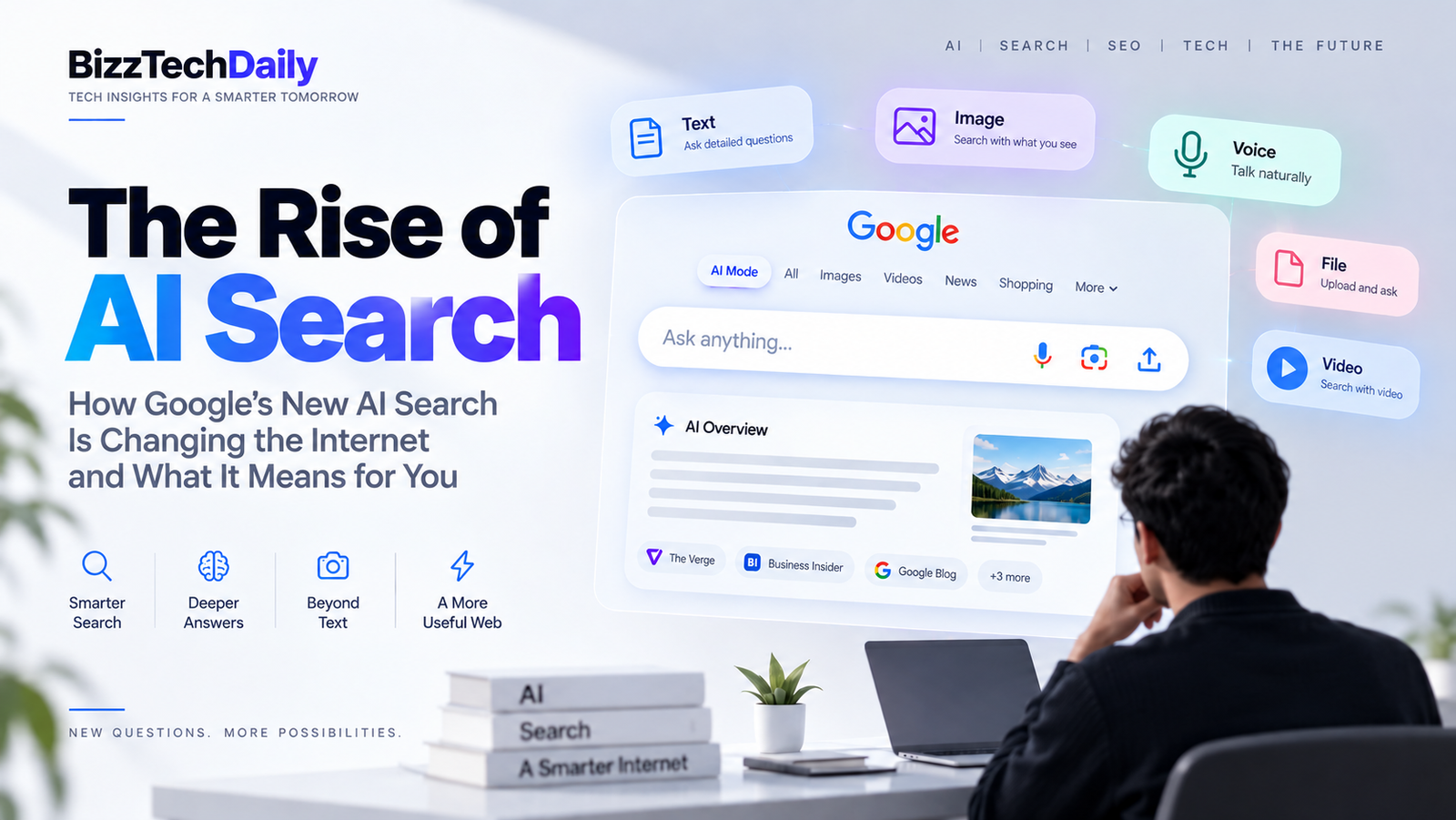
AI Search is changing that process.
Instead of simply matching keywords with webpages, modern AI-powered search experiences can understand longer questions, combine information from multiple sources, generate a conversational response and provide links for deeper exploration.
And increasingly, Search is moving beyond answering questions toward helping users research, compare and complete tasks.
Google’s current AI Search experience includes AI Overviews and AI Mode, with follow-up conversations and links to supporting web content.
What Is AI Search?
AI Search is a search experience that uses artificial intelligence to understand a user’s intent, retrieve relevant information and synthesize it into a more direct response.
Traditional Search vs AI Search
| Traditional Search | AI Search |
|---|---|
| Keywords | Natural-language questions |
| List of links | Synthesized response + links |
| Multiple searches | Follow-up questions |
| User compares sources | AI helps organize information |
| Mostly text queries | Text, images, files and other inputs |
| Find information | Understand + explore + increasingly act |
AI Search is part of a broader shift toward AI-powered search experiences, where search engines increasingly understand context rather than simply matching keywords.
How Does AI Search Actually Work?
When you type a simple query into a traditional search engine, the process can look relatively straightforward: you enter a query, the search system retrieves relevant results, and you choose which pages to open.
AI Search adds another layer.
Instead of treating every question as a short collection of keywords, newer AI search systems can interpret the broader intent, break complex questions into smaller searches, retrieve information from multiple sources and then organize that information into a response.
Google calls one part of this process “query fan-out.” In AI Mode, a complex question can be broken into multiple related searches that are run across different subtopics before the system combines the information into a response.
The AI Search Process
| Step | What happens | Simple example |
|---|---|---|
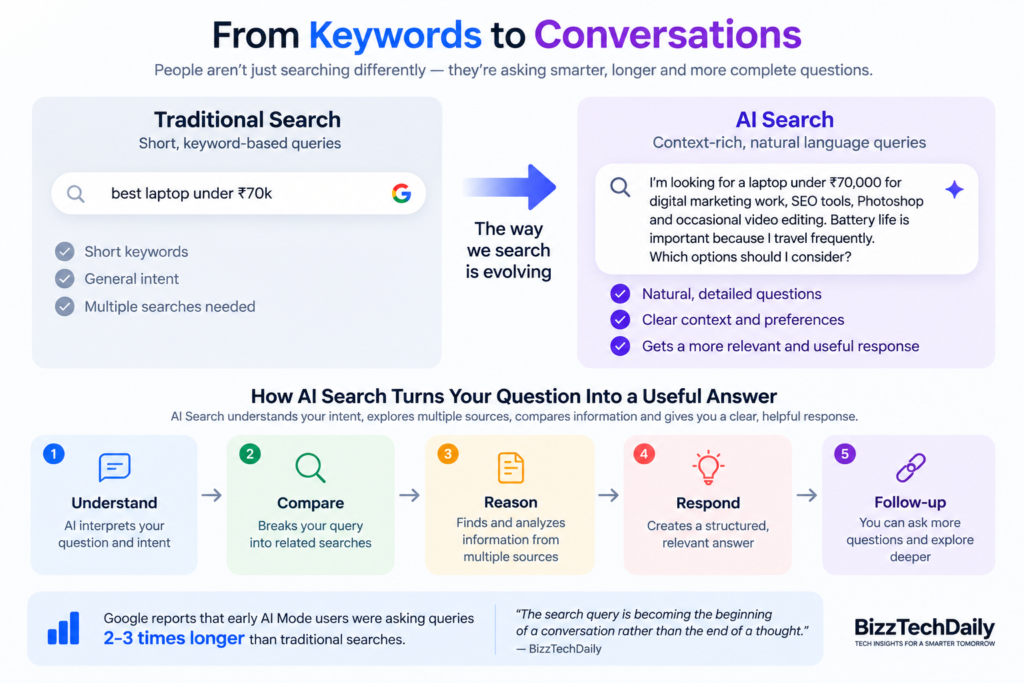
| 🧠 1. Understand | AI interprets the question, context and intent | “I need a laptop for editing under ₹70,000” |
| 🔍 2. Break down | A complex question can be divided into smaller searches | Price → performance → battery → reviews |
| 🌐 3. Retrieve | Search systems find relevant information from the web and other available sources | Product pages, reviews, specifications |
| ⚙️ 4. Reason | AI evaluates and connects the information | Which options actually fit the requirements? |
| ✍️ 5. Generate | The system creates a structured response | Shortlist + explanation |
| 🔗 6. Explore | The user can inspect sources, ask follow-ups or continue researching | “Compare option 1 and 2” |
The important difference is that AI Search isn’t simply generating an answer from memory. Modern AI Search products combine AI models with search and information-retrieval systems so they can find and organize information from the web. Google says AI Mode is built around its Search systems and can use sources such as web content, the Knowledge Graph, real-world information and shopping data.
Example: One Question, Multiple Searches
Imagine someone asks:
“I’m planning a 5-day trip to Dubai in November. I have ₹1 lakh for two people. Which areas should I stay in, what attractions should I prioritize and how should I plan the itinerary?”
A traditional search approach might require several separate searches:
Dubai hotels under ₹X
↓
Best areas to stay in Dubai
↓
Dubai attractions
↓
Dubai itinerary 5 days
↓
Dubai November weather
An AI Search system can potentially break the original question into these related subtopics and research them together.
That’s the significance of query fan-out: the user asks one complex question, while the search system performs multiple related searches behind the scenes. Google says AI Mode uses this approach specifically to handle questions that previously required multiple searches.
The search box is becoming less like a keyword field and more like a research interface.
And that’s one of the biggest changes happening in search.
USER QUESTION
↓
UNDERSTAND INTENT
↓
BREAK INTO SUB-QUESTIONS
↓
SEARCH MULTIPLE SOURCES
↓
CONNECT & REASON
↓
GENERATE RESPONSE
↓
SOURCES + FOLLOW-UP
AI Overviews vs AI Mode vs Traditional Google Search
AI Search isn’t one single feature. Google’s Search experience now combines traditional results with AI-powered experiences such as AI Overviews and AI Mode. Google describes AI Overviews as a quick AI-generated snapshot within Search, while AI Mode is designed for deeper, conversational exploration and follow-up questions.
The difference at a glance
| Feature | Traditional Google Search | AI Overviews | AI Mode |
|---|---|---|---|
| Main purpose | Find relevant webpages and information | Give a quick AI-generated overview | Explore complex questions through AI |
| How you search | Keywords or questions | Question/query | Natural-language questions |
| Answer format | Search results, links, images, videos, etc. | AI summary + supporting links | Conversational AI response + web links |
| Follow-up questions | Usually requires another search | Can continue into deeper exploration | Core part of the experience |
| Complex questions | Often require multiple searches | Can summarize more complex queries | Designed for multi-part questions |
| Multimodal input | Varies by Search feature | Increasingly supported | Text, images, files, videos and other inputs |
| Query fan-out | Traditional retrieval | May use AI-powered retrieval | Used to break complex questions into related searches |
| Research depth | Mostly user-driven | Quick exploration | Deeper conversational research |
| Direction of travel | Find information | Understand information faster | Explore, compare and increasingly take action |
Google says AI Mode and AI Overviews are increasingly being brought together into a seamless Search experience, allowing users to move from an AI Overview into a follow-up conversation in AI Mode while continuing to access links to the web. blog.google
Think of them this way
Traditional Search
“Here are the places where you might find the answer.”
↓
AI Overviews
“Here is a quick explanation, with sources you can explore.”
↓
AI Mode
“Let’s investigate the question together.”
That distinction matters because AI Search isn’t necessarily replacing the web results page. It is changing the layer that sits between the user’s question and the information on the web.
Google has also continued adding ways for people to discover original articles, websites and firsthand perspectives from within AI Search.
⚡ BizzTechDaily Take
The biggest change isn’t that Google can generate an answer. It’s that Search is increasingly becoming an interface for exploring information rather than simply a directory of links.
Why Are People Searching Differently With AI?
One of the biggest changes brought by AI Search isn’t simply how Google answers questions. It’s how people ask them.
Traditional search encouraged short queries:
best laptop under ₹70,000
AI Search makes it more natural to explain the entire problem:
I’m looking for a laptop under ₹70,000 for digital marketing work, SEO tools, Photoshop and occasional video editing. Battery life is important because I travel frequently. Which options should I consider?
The second question contains context, constraints, preferences and intent.
That’s exactly the kind of search AI systems are designed to handle.
Google reported that early AI Mode users were asking queries roughly 2–3 times longer than traditional searches. Google also says AI Mode users increasingly use Search for exploratory questions, comparisons, trip planning and complex how-to tasks.
From Keywords to Conversations
| Traditional Search | AI Search |
|---|---|
| “best phones 2026” | “Which phone should I buy for photography and gaming under ₹60,000?” |
| “Dubai hotels” | “Find areas in Dubai that are convenient for a 5-day first-time trip.” |
| “GST registration” | “Explain GST registration for a small Indian service business and what documents I need.” |
| “SEO tools” | “Compare SEO tools for a small agency managing 10 local-business websites.” |
| “best laptop” | “Which laptop fits my work, budget and software requirements?” |
The difference isn’t just query length.
It’s intent density.
A longer AI Search query can tell the system:
- what the user wants
- why they want it
- their budget
- their constraints
- their preferences
- what they already know
- what they want to compare
That gives AI Search considerably more context to work with.
Search Is Becoming More Exploratory
Traditional search often follows a pattern:
Question → Results → Click → Read
AI Search increasingly creates a different loop:
Question → AI response → Follow-up → Refine → Compare → Explore sources
Google says AI Mode is designed for follow-up questions and deeper exploration, while its 2026 updates connect AI Overviews and AI Mode into a more continuous Search experience. blog.google
For example:
User:
What’s the best way to learn digital marketing?
Follow-up:
I’m already working with Meta Ads and SEO. What should I learn next?
Follow-up:
Which skills would help me move toward performance marketing?
The user hasn’t started three separate searches.
They’re having one evolving research session.
⚡ BizzTechDaily Insight
The search query is becoming the beginning of a conversation rather than the end of a thought.
That’s an important shift for both users and publishers.
AI Search Is Becoming Multimodal
A modern AI Search experience can increasingly understand what you type, what you show it and what you upload.
That means the question doesn’t always have to be:
“What is this?”
It can become:
“Look at this and tell me what I’m looking at, why it matters and what I should do next.”
Google’s 2026 Search updates describe support for text, images, files, videos and Chrome tabs as inputs in its AI-powered Search experience. Search Live also allows users to have an interactive conversation using voice and a camera.
What Multimodal Search Looks Like
| Input | What you can do |
|---|---|
| 📝 Text | Ask a question or describe a problem |
| 📷 Image | Show an object, product, document or scene |
| 🎙️ Voice | Ask questions naturally without typing |
| 📄 Files | Ask questions about documents or other uploaded material |
| 🎥 Video | Use visual information as part of a search |
| 🌐 Web context | Continue researching information across the web |
A Simple Example
Imagine you’re walking through a store and see a product you’ve never seen before.
With traditional search, you might have to:
Identify product → Find its name → Search specifications → Search reviews → Compare alternatives
With multimodal AI Search, the process can become:
📷 Take a picture
↓
AI identifies what you’re looking at
↓
🔎 Search finds relevant information
↓
🧠 AI explains what it is
↓
⚖️ Compare alternatives
↓
🔗 Explore sources
The technology behind this combines visual understanding with search. Google has described AI Mode using Lens and Gemini to understand objects and their relationships within an image, then run multiple related searches to produce a more detailed response.
Search Is Moving From “Type” to “Show”
This may sound like a small interface change, but it has a much bigger implication.
Humans don’t experience the world as keywords.
We see:
- a broken machine
- an unfamiliar plant
- a product on a shelf
- a document
- a chart
- a road sign
- a piece of clothing
- a technical problem
AI Search increasingly allows those real-world objects and situations to become search queries themselves.
Instead of translating what you see into keywords, you can increasingly show the search engine what you see.
That’s a major shift in how information can be discovered.
📊 A useful data point
Google reported in May 2026 that more than one in six U.S. AI Mode searches used voice or images, while image searches were growing by more than 40% month over month at that time. Google also reported that the average AI Mode search was three times the length of a traditional Search query. These figures are Google’s own U.S. measurements, so they shouldn’t be treated as representative of every market.
⚡ BizzTechDaily Insight
The future of search isn’t necessarily a better way to type a question. It may be a search engine that understands the question you were never able to put into words.
AI Search vs Chatbots — What’s the Difference?
AI Search and AI chatbots are becoming increasingly similar, but they are not exactly the same thing.
A traditional AI chatbot is primarily designed around conversation, reasoning and content generation. AI Search, on the other hand, is built around finding, organizing and exploring information, with web search playing a central role.
The boundaries are becoming less obvious as both technologies add capabilities from the other side.
Google’s AI Mode, for example, combines conversational interaction with Search, web links, multimodal inputs and Google’s information systems.
AI Search vs AI Chatbots
| AI Search | General AI Chatbot | |
|---|---|---|
| Primary purpose | Find and explore information | Converse, reason and generate |
| Web search | Central to the experience | Depends on the product and mode |
| Current information | Designed around web/search information | May require web access |
| Source links | Important part of the experience | Varies by product |
| Follow-up questions | Yes | Yes |
| Content generation | Increasingly capable | Core capability |
| Multimodal interaction | Increasingly common | Common in leading products |
| Research | Search + AI synthesis | Reasoning + available information |
| Information discovery | Core function | Usually secondary |
| Direction | Search becoming conversational | Conversation becoming increasingly connected to the web |
SEARCH ENGINE
🔎 Find information
↕️
AI SEARCH
🔎 + 🧠 Find + understand
↕️
AI ASSISTANT
🧠 + 🔧 Understand + create + act
What Happens to Websites and Publishers?
AI Search creates a complicated new environment for websites.
On one side, AI can become another discovery channel that sends readers toward useful websites.
On the other, if an AI system gives users enough information directly in the search experience, some users may have less reason to visit individual webpages.
That creates a new question for publishers:
If AI can summarize the answer, why would someone still click the website?
The answer may increasingly depend on what the website offers beyond a basic answer.
The Opportunity
Google says its AI Search experiences are designed to help users discover websites, and recent updates have added more inline links, website previews and ways to surface original content. Google also says AI Overviews and AI Mode are generating opportunities for publishers and creators to reach people with new kinds of questions. blog.google
That means AI Search doesn’t necessarily mean:
AI answer → website disappears
It can also mean:
AI answer → discover source → click → explore deeper
For example, someone searching:
“How does India’s UPI system work?”
may get a basic explanation directly in Search.
But someone researching:
“How will agentic payments change UPI and online commerce?”
may want:
- detailed analysis
- recent developments
- expert perspectives
- data
- examples
- charts
- comparisons
- original reporting
That’s where a publisher can provide value that a short AI summary cannot fully replace.
The Challenge: Commodity Content
The bigger problem may be generic content.
Imagine 100 websites publish almost the same article:
“What is AI Search?”
Each article defines AI Search in roughly the same way.
An AI system can potentially summarize the basic concept without users needing to read all 100 pages.
This creates pressure on publishers to provide something distinctive.
Content That Becomes More Valuable
| Generic Content | Differentiated Content |
|---|---|
| Basic definitions | Original explanations |
| Rewritten news | Original reporting |
| Generic lists | First-hand analysis |
| Repeated statistics | Original data and interpretation |
| Surface-level comparisons | Detailed testing |
| AI-generated summaries | Expert perspectives |
| Information available everywhere | Information readers can’t easily find elsewhere |
Google’s latest guidance explicitly emphasizes unique, non-commodity content for websites navigating AI Search. blog.google
This Changes the Publisher’s Job
The old publishing model could be simplified as:
Find topic → Write article → Rank → Get click
The emerging model looks more like:
Find important question
↓
Provide genuinely useful information
↓
Add original value
↓
Become a source worth discovering
↓
Earn visibility across Search + AI experiences
↓
Turn discovery into a returning audience
That’s a much bigger shift than simply “optimizing content for AI.”
What Does AI Search Mean for SEO?
For years, SEO could be simplified into a familiar formula:
Keyword → Ranking → Click
AI Search adds another layer.
A user may now ask a complex question, receive an AI-generated response, see several supporting sources and then decide which website deserves a deeper visit.
That means SEO isn’t disappearing.
The definition of visibility is expanding.
From Keywords to Information Value
| Traditional SEO Mindset | AI Search Era |
|---|---|
| Target a keyword | Understand the user’s question |
| Match search intent | Solve the underlying problem |
| Optimize individual pages | Build topical depth |
| Get a ranking | Become a useful source |
| Attract a click | Earn discovery + engagement |
| Write for search engines | Write for people and information systems |
Google says the same foundational SEO practices remain relevant for appearing in AI features, while recommending that websites focus on unique, non-commodity content and strong page experiences.
The evolution from conversational Search toward systems that can take actions is closely connected to the rise of AI agents in 2026.
So What Should Websites Actually Do?
1. Create Content That Adds Something New
If 50 websites already explain the same basic concept, simply rewriting those explanations gives readers little reason to choose your page.
Instead, add:
- Original analysis
- First-hand experience
- Unique examples
- Original data
- Comparisons
- Expert commentary
- Practical frameworks
- Useful visuals
- New perspectives
Google specifically highlights unique, non-commodity content as important for websites navigating generative AI Search.
2. Answer the Main Question — Then Go Deeper
Don’t bury the answer under 1,000 words of introduction.
Give readers the core answer quickly.
Then provide the depth they can’t get from a basic summary.
For example:
Question:
What is AI Search?
Basic answer:
AI Search uses AI to understand queries and provide synthesized responses.
That’s useful—but generic.
A stronger article continues:
How does it retrieve information?
How does it differ from traditional Search?
What happens to publishers?
How does it affect SEO?
What happens when AI starts taking actions?
That’s where information depth becomes valuable.
3. Build Topical Authority
AI Search makes individual keywords less interesting than the relationship between topics.
For example, BizzTechDaily shouldn’t only publish:
What Is AI Search?
It can build a connected cluster:
AI Search
↓
How AI Search Works
↓
AI Search vs Google Search
↓
AI Search & SEO
↓
AI Search and Website Traffic
↓
AI Agents
↓
Agentic Search
Each article answers a different question while strengthening the overall topic coverage.
This is why internal linking becomes particularly important.
4. Make Pages Easy to Understand
Good structure isn’t only for humans.
Clear:
- headings
- tables
- lists
- descriptive titles
- images
- captions
- internal links
- structured data
help organize information on the page.
Google’s Search documentation says structured data can help Google understand page content, while its AI Search guidance emphasizes clear organization and quality page experiences.
5. Don’t Chase “AI SEO Hacks”
This is important.
There is a lot of discussion around terms like:
AEO
GEO
LLM SEO
AI SEO
Some of these can be useful ways to describe emerging search strategies.
But there isn’t a magic technique that guarantees inclusion in an AI-generated response.
Google’s own documentation says that established SEO best practices remain relevant for its generative AI Search features.
So instead of asking:
“How do I trick AI into citing my website?”
A better question is:
“What information can my website provide that deserves to be discovered?”
Frequently Asked Questions About AI Search
1. What is AI Search?
AI Search is a search experience that uses artificial intelligence to understand a user’s question, retrieve relevant information and generate a more direct, synthesized response. Unlike traditional search, it can handle conversational questions, follow-ups and, in some implementations, multimodal inputs such as images and files. Google Help
2. How does AI Search work?
AI Search can interpret the user’s intent, break complex questions into related subtopics, search for relevant information and combine the results into a response. Google’s AI Mode describes this process as query fan-out, where a complex question can be divided into multiple searches that are performed simultaneously. Google Help
3. What is the difference between AI Search and Google Search?
Traditional Google Search primarily presents links and other search results for a query. AI Search adds an AI layer that can synthesize information, answer complex questions and support conversational follow-ups while still providing links to web sources. Google Help
4. Is AI Search replacing traditional search engines?
Not completely. AI Search is becoming part of the broader search experience rather than simply eliminating traditional results. Google continues to provide web links and other search results alongside AI-powered experiences. Users can also access traditional web results through Search features such as the Web filter. Google Help
5. How does AI Search affect SEO?
AI Search doesn’t eliminate the fundamentals of SEO. Websites still need useful, accessible and well-structured content. However, the increasing use of AI-generated responses makes original information, strong topical coverage, useful page experiences and content that provides genuine value increasingly important.
6. Will AI Search reduce website traffic?
The effect can vary by query and website. AI-generated responses may answer some questions without requiring a user to visit multiple websites, while links within AI Search can also provide opportunities for users to discover publishers and other sources. The impact therefore depends heavily on the type and value of the content a website provides.
7. Can AI Search use images and files?
Yes. Google’s current AI Mode supports questions using text, voice, images and files, and users can ask follow-up questions about the information they provide. Google Help
8. Is AI Search always accurate?
No. AI Search systems can make mistakes or misunderstand information. Google explicitly warns that AI Mode does not always get things right and recommends checking important information against multiple sources.